Vector Futuristic Gradients: A Practical Guide for Modern Design Projects
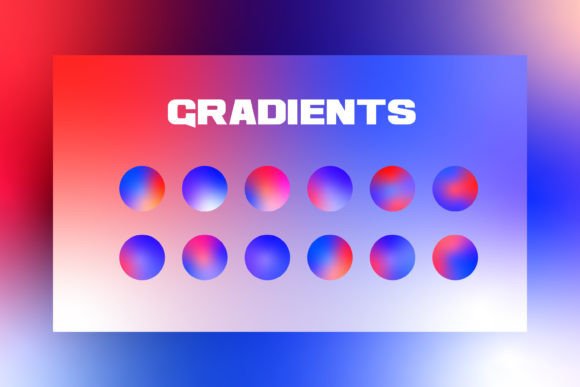
In the evolving landscape of digital and print media, visual language dictates engagement. Designers frequently seek assets that balance aesthetic innovation with technical flexibility. Vector Futuristic Gradients have emerged as a significant resource in this space, offering a distinct approach to background creation and visual hierarchy. Unlike static images or raster-based effects, these gradients provide a scalable, editable foundation suitable for everything from high-resolution web interfaces to large-format event posters. Understanding what makes this specific style effective requires looking beyond the surface visuals to examine the underlying mechanics, file structures, and practical applications.
Defining the Vector Advantage in Futuristic Design
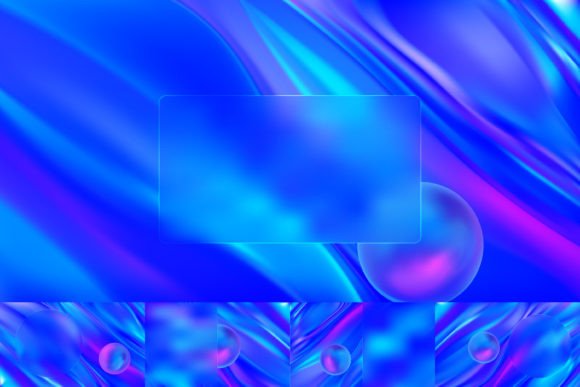
The term "futuristic" in design often implies a departure from organic textures toward sleek, luminous, and geometric aesthetics. When combined with vector technology, this style gains a layer of precision that is difficult to achieve with other methods. Vector Futuristic Gradients are defined by their mathematical construction rather than pixel grids. This means every curve, color transition, and light source is calculated based on coordinates and equations. The result is an illustration that remains crisp regardless of how much it is scaled up or down.
This distinction is critical for professionals working across multiple mediums. A raster image, such as a standard JPEG or PNG, has a fixed resolution. If you enlarge it beyond its original dimensions, the image degrades, becoming pixelated or blurry. In contrast, a vector-based gradient maintains its integrity at any size. Whether the asset is used for a small mobile app icon or a massive billboard, the edges remain sharp and the color transitions smooth. For designers managing projects that require consistency across various touchpoints, this scalability is not merely a convenience; it is a necessity.
The RGB Color Mode and Digital Versatility
A key technical specification of these resources is the use of the RGB (Red, Green, Blue) color mode. This is the standard for all screen-based displays, including monitors, smartphones, tablets, and televisions. RGB allows for a wider gamut of vibrant colors compared to CMYK, which is used for printing. Because Vector Futuristic Gradients are optimized for RGB, they deliver the intense, glowing effects characteristic of futuristic themes without the color shifting or dullness that can occur when converting from print profiles.
However, this optimization brings a specific tradeoff. While perfect for digital promotion on platforms like Instagram, Twitter, Facebook, and web design, direct use in offset printing requires careful conversion. If a project involves physical flyers, magazines, or event papers, the designer must convert the RGB values to CMYK during the production phase. Fortunately, because the elements are fully editable vectors, this conversion can be done precisely within professional software, ensuring the final print output retains as much vibrancy as possible while adhering to press limitations.
Comparing Vector Gradients to Alternative Resources
When evaluating design assets, it is essential to compare Vector Futuristic Gradients against other common options available in the market. Designers often choose between stock photography, raster illustrations, and flat design templates. Each has its place, but the vector gradient offers a unique middle ground that combines the depth of illustration with the adaptability of code-like precision.
Stock Photography vs. Vector Illustration
High-quality stock photos can provide realistic backgrounds, but they often lack the cohesive, stylized look required for futuristic branding. Photos can also be heavy in file size, slowing down website load times. Furthermore, modifying a photograph to match a specific brand palette is difficult without compromising the image quality. With Vector Futuristic Gradients, every element is independent. You can isolate a single shape or color band and change it instantly to match your brand guidelines, something impossible with a photographic background.
Raster Assets vs. Editable Vectors
Many online resources offer pre-made gradient backgrounds in JPG or PNG formats. These are quick to download and implement, making them attractive for urgent tasks. However, they are rigid. If a client requests a slight shift in the angle of the light or a different hue for the secondary color, the designer must start over or attempt complex masking in Photoshop. The primary advantage of the vector format is total editability. Since all elements are 100% vector, you can adjust the path, modify the gradient stops, and alter the opacity of individual layers without losing quality. This flexibility significantly reduces revision time and increases the value delivered to clients.
Evaluating Use Cases and Best-Fit Scenarios
The versatility of these gradients makes them applicable to a wide range of projects, but they shine brightest in specific contexts where modernity and clarity are paramount.
- Web Design and UI/UX: For landing pages, SaaS dashboards, and tech startup websites, these gradients provide a dynamic backdrop that does not distract from content. Their lightweight nature ensures fast loading speeds, a crucial factor for SEO and user retention.
- Social Media Promotion: Platforms like Instagram and Twitter rely heavily on visual impact. The vibrant RGB colors of Vector Futuristic Gradients stand out in crowded feeds. Because they are easily resizable, one master file can generate assets for profile banners, story overlays, and post backgrounds, maintaining brand consistency.
- Publication and Print Materials: While the source is RGB, the vector nature allows for high-resolution export. For flyers, posters, magazine covers, and event programs, these graphics can be printed at large scales without blurring. The clean lines and abstract shapes work well for tech conferences, product launches, and corporate events.
When to Choose Another Option
Despite their strengths, Vector Futuristic Gradients are not a universal solution. There are scenarios where alternative approaches may be more appropriate. If a project requires photorealism, such as an architectural rendering or a fashion editorial, a vector gradient will likely feel too abstract or artificial. Similarly, if the target audience prefers a minimalist, flat design aesthetic without complex lighting effects, these gradients might introduce unnecessary visual noise.
Additionally, consider the technical constraints of the end-user. If the final output is for a legacy system that only supports low-resolution bitmaps, the benefits of vector scalability are negated. In such cases, a simple, flattened raster image might be more practical. It is also important to note that creating or editing these files requires access to vector software like Adobe Illustrator. Teams without this software capability may find the learning curve steep, making pre-rendered raster assets a more immediate, albeit less flexible, choice.
Technical Workflow and File Management
Efficiency in design workflows is often determined by the organization of the provided assets. A robust resource package for Vector Futuristic Gradients typically includes a main folder containing multiple file formats to accommodate different stages of the production process.
The inclusion of Ai (Adobe Illustrator) and Eps (Encapsulated PostScript) files is vital for the editing phase. These formats preserve the vector data, allowing designers to manipulate individual paths, text, and color attributes. Having both ensures compatibility across different versions of design software and operating systems. The Jpeg files serve as a quick preview or a ready-to-use option for non-vector environments, saving time when a rapid mockup is needed.
Furthermore, the presence of a help file is a significant indicator of quality. It suggests that the creator anticipates potential questions regarding usage, licensing, or technical implementation. This documentation can guide users through the process of adjusting colors, separating layers, or exporting for specific print requirements. For professionals managing tight deadlines, having clear instructions reduces trial and error, streamlining the path from concept to final delivery.
Making an Informed Decision
Selecting the right visual assets is a strategic decision that impacts both the aesthetic appeal and the functional performance of a design project. Vector Futuristic Gradients offer a compelling combination of high-quality visuals, infinite scalability, and deep customization. They are particularly well-suited for projects requiring a modern, tech-forward look across digital and print channels.
However, the decision should always align with the specific goals of the campaign and the capabilities of the design team. If the priority is rapid deployment with minimal editing, simpler raster assets might suffice. But if the project demands long-term flexibility, brand adaptation, and high-resolution output for diverse media, the investment in vector resources pays dividends in efficiency and quality. By understanding the tradeoffs between editability, file formats, and color modes, designers can confidently choose the tools that best serve their creative vision and technical requirements.